Create hotkeys for sound volume

Sound Volume-7 is a free program for Windows that allows users to create hotkeys that work to control desktop or laptop volume quickly and comfortably. In this way, Sound Volume-7 transforms your keyboard into a multimedia controller. It’s backwards compatibility also makes it a useful solution for most users running Windows 2000 and up to Windows 7.

Control your volume

For most traditional laptops and desktops, volume is controlled by mouse from the menu in the bottom right-hand control of the screen. Though it’s effective in execution, it’s also cumbersome, as you generally have to open a new window or move away from your open window. With Sound Volume-7, changing volume is as easy as pressing a key or combination of keys. Not only is it faster, it’s also more intuitive and comfortable to perform. Users can adjust volume up and down, as well as mute. It’s a simple program designed for a simple task, but it can make a world of difference for power users who navigate quickly for fast results.

Easy combinations

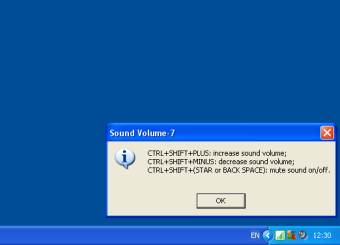
Settings hotkeys for volume is not only easy to do, but these simple combinations are easy to execute too. Combinations like CTRL + SHIFT + PLUS can increase sound volume, while CTRL + SHIFT + MINUS decreases. Meanwhile, CTRL + SHIFT + (STAR or BACK SPACE) will mute sound on/off.


  • Pros

    • Control volume with hotkeys
    • Free to download
  • Cons

    • Not available on official Windows store
    • Not compatible with latest Windows release
 0/1

App specs

  • License

    Free

  • Version

    1

  • Latest update

  • Platform

    Windows

  • OS

    Windows NT

  • Language

    English

    Available languages

    • German
    • English
    • Spanish
    • French
    • Italian
    • Dutch
    • Polish
    • Portuguese
  • Downloads

    117.1K

    Last month's downloads

    • 127
  • Size

    334.92 KB

  • Developer

Program available in other languages


User reviews about Sound Volume-7

4

1 reviews

Add review

Main reviews for you

  • Anonymous user

    I do not recommend this product at all it is not loud at all.

More

You may also like

Alternatives to Sound Volume-7

Explore Apps

Latest articles

Laws concerning the use of this software vary from country to country. We do not encourage or condone the use of this program if it is in violation of these laws.
Softonic

Is Sound Volume-7 safe?

100/100

Score result: Clean

This file passed a comprehensive security scan using VirusTotal technology. It is safe to download.

  • Virus free
  • Spyware free
  • Malware free
  • Verified by Security Partners

    VirusTotal logo

Scan Info

Last scan
Friday, January 15, 2021
Scan provider
VirusTotal · Full report

File Integrity

File
sound_volume-7.exe
SHA256
16e4c9f68a5b34dcd17d536f7b21ffcce3e202570dd93367e10fe6b0f12e3c50
SHA1
995a0ed004a41813791fa39febe469fbe0ec64ea

Softonic security commitment

Sound Volume-7 has been thoroughly scanned by our advanced security systems and verified by industry-leading partners. This file comes from the official developer and has passed all our security checks, showing no signs of viruses, malware, or spyware. For more information, visit our Security and Trust Center